
Messaging on desktop without losing your flow
WhatsApp Desktop is a free messaging application that brings mobile messaging to a larger screen, sitting in the messaging and productivity genre. It mirrors conversations from your phone while allowing you to type, send files, and manage chats directly from your computer.

Unlock your creativity with Adobe Stock
Get 10 images or 1 video with a free trial
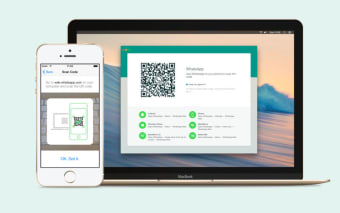
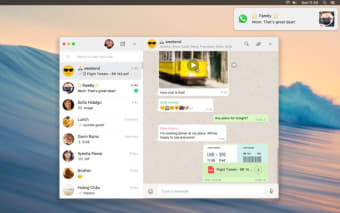
WhatsApp Desktop creates a desktop messaging sync experience that feels seamless across devices. Once linked, messages appear in real time, letting users continue conversations without constantly switching between phone and PC. Visually, its interface stays familiar, with a chat list on the side and active conversations displayed clearly, making navigation simple and consistent.
From quick chats to full desktop communication
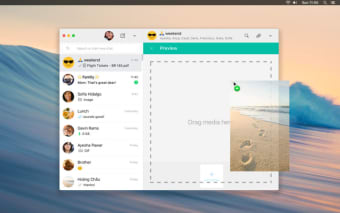
As a messaging tool, WhatsApp Desktop focuses on speed and convenience. Messages are delivered instantly, and typing on a keyboard makes longer conversations easier to manage. This results in a real time messaging system that supports both casual chats and more detailed communication. Users can send images, documents, voice notes, and videos directly from their computer, expanding what can be shared compared to mobile-only use.
What defines this is its simplicity. It does not try to replace the mobile app but instead extends it. Conversations, contacts, and media stay synchronized, ensuring continuity between devices. The app performs well for messaging and file sharing, but it may lack deeper customization or advanced communication tools found in other platforms. Even so, its reliability and ease of use make it a practical option for everyday communication.
The layout is clean, with clear message bubbles, timestamps, and media previews that keep conversations easy to follow. Notifications appear on the desktop, helping users stay updated without opening the app constantly. Audio calls and voice messages work smoothly, providing clear sound during interactions. This creates a cross-device communication setup that fits naturally into a desktop workflow. However, some features still feel mobile dependent features.
A dependable desktop companion for everyday messaging
WhatsApp Desktop succeeds by extending a familiar messaging experience onto the computer without adding friction or unnecessary complexity. Its real-time sync, easy file sharing, and clean interface make it especially useful for users who want to stay in touch while working or multitasking. However, it still feels more like an extension of the mobile app than a fully independent desktop platform. It remains practical, reliable, and easy to keep open.















.png)


.webp)
.webp)